
Platform comparison · Updated June 2026

DociShield vs PandaDoc

Both DociShield and PandaDoc help businesses send documents, collect signatures, and process payments. PandaDoc is built around proposal creation, sales document automation, and interactive document workflows. It is a strong choice for sales teams that need to create, send, and close proposals with embedded pricing tables and CRM integration.

DociShield focuses on governed document transactions. The most significant workflow difference is payment timing. PandaDoc recipients sign first and pay after as a separate step. DociShield keeps payment inside the same transaction flow. After signing, the recipient proceeds directly to payment and the agreement is only marked as executed once both the signature and payment events have been completed. There is no separate invoice workflow, follow up request, or disconnected payment step.

PandaDoc-style proposal on a monitor showing pricing tables, service options, and product selections
The big idea

Signature and payment, in the same transaction flow.

Both platforms are strong products built for different workflows. The defining difference is whether payment continues inside the same transaction flow as signing, or arrives as a separate step afterwards.

01
Document
02
Review
03
Sign
04
Pay
05
Protect
06
Audit
07
Complete
Feature breakdown

What each platform includes.

Sourced from public pricing pages and product documentation. Verified June 2026.

Capability
PandaDoc
DociShield
PandaDoc offers deep proposal formatting, interactive pricing tables, and document automation designed for sales teams. DociShield does not offer the same depth of proposal creation tooling. For businesses whose primary need is sales proposal creation, PandaDoc is the stronger fit in that category.
DociShield keeps payment inside the same transaction flow. After signing, the recipient proceeds directly to payment and the agreement is only marked as executed once both the signature and payment events have been completed. There is no separate invoice workflow, follow up request, or disconnected payment step.
Where the workflows diverge

Two payment workflows, two outcomes.

PandaDoc completes the signature and then sends a separate payment request afterwards, leaving the transaction waiting for payment to arrive as its own step. DociShield keeps payment inside the same transaction. After signing, the recipient continues directly to payment and the agreement is only marked as executed once both events are complete.
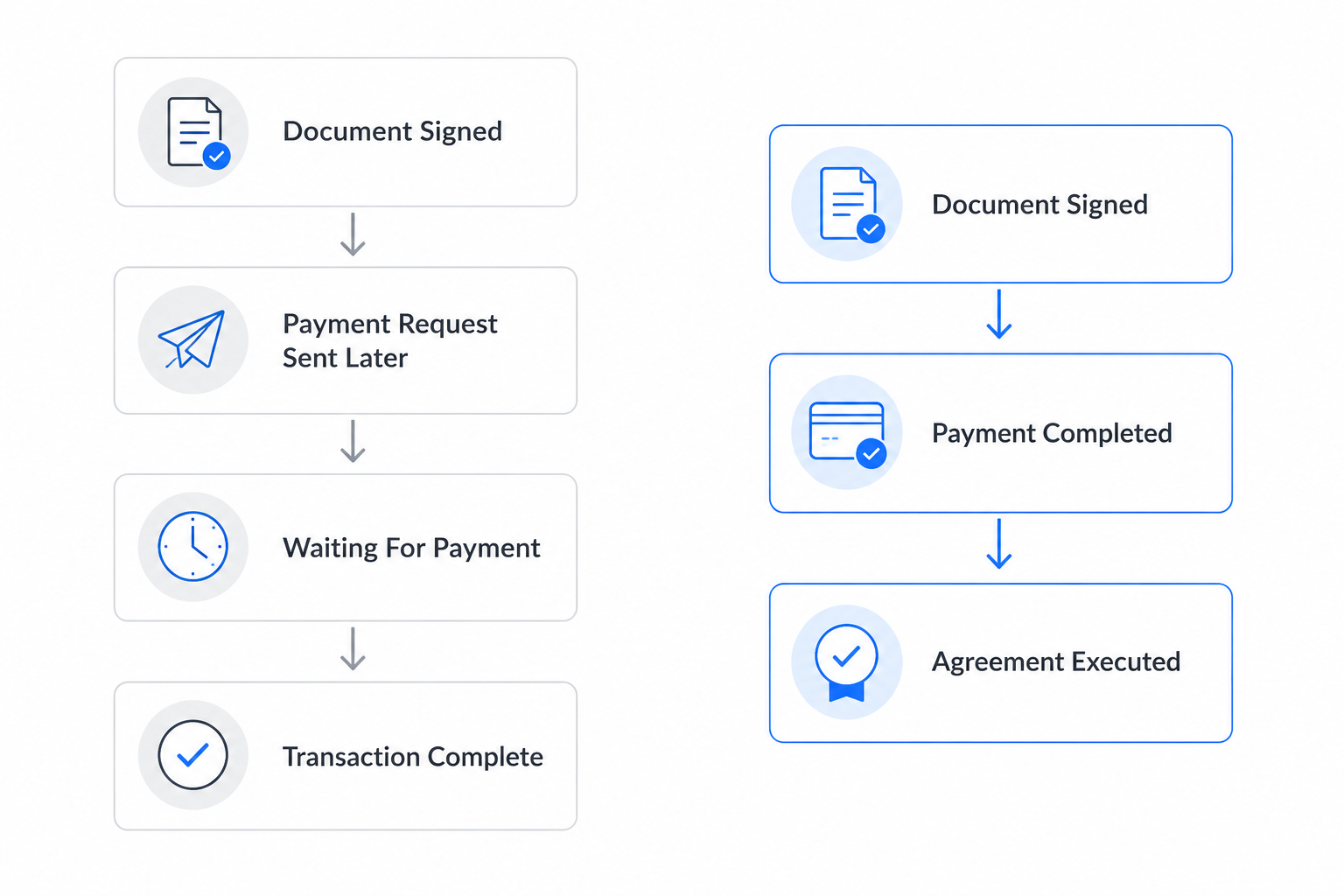
Diagram comparing PandaDoc's sign-then-pay-later flow against DociShield's continuous sign-then-pay-then-execute flow
Other notable differences

Where else the platforms differ.

01

Proposal creation

PandaDoc offers deep proposal formatting, interactive pricing tables, and document automation designed for sales teams. DociShield does not offer the same depth of proposal creation tooling. For businesses whose primary need is sales proposal creation and document automation, PandaDoc is the stronger fit in that category.

02

SMS and WhatsApp delivery

SMS delivery on PandaDoc is available on Business Annual and Enterprise Annual plans only. WhatsApp delivery was not confirmed in official PandaDoc documentation reviewed in June 2026. DociShield supports SMS and WhatsApp on all standard plans. Usage allowances and overage charges apply based on plan and volume.

Payment Timing

One continuous transaction, executed when complete.

On DociShield the agreement progresses through review, signature, payment and execution as one connected process. There is no separate invoice workflow, no follow-up request, and no disconnected payment step. The agreement is only marked as executed once both the signature and payment events have been completed.

For service businesses sending agreements with deposit, milestone or balance payments tied to execution, keeping the entire transaction inside a single governed flow can reduce chasing, follow-ups, and missed payments.
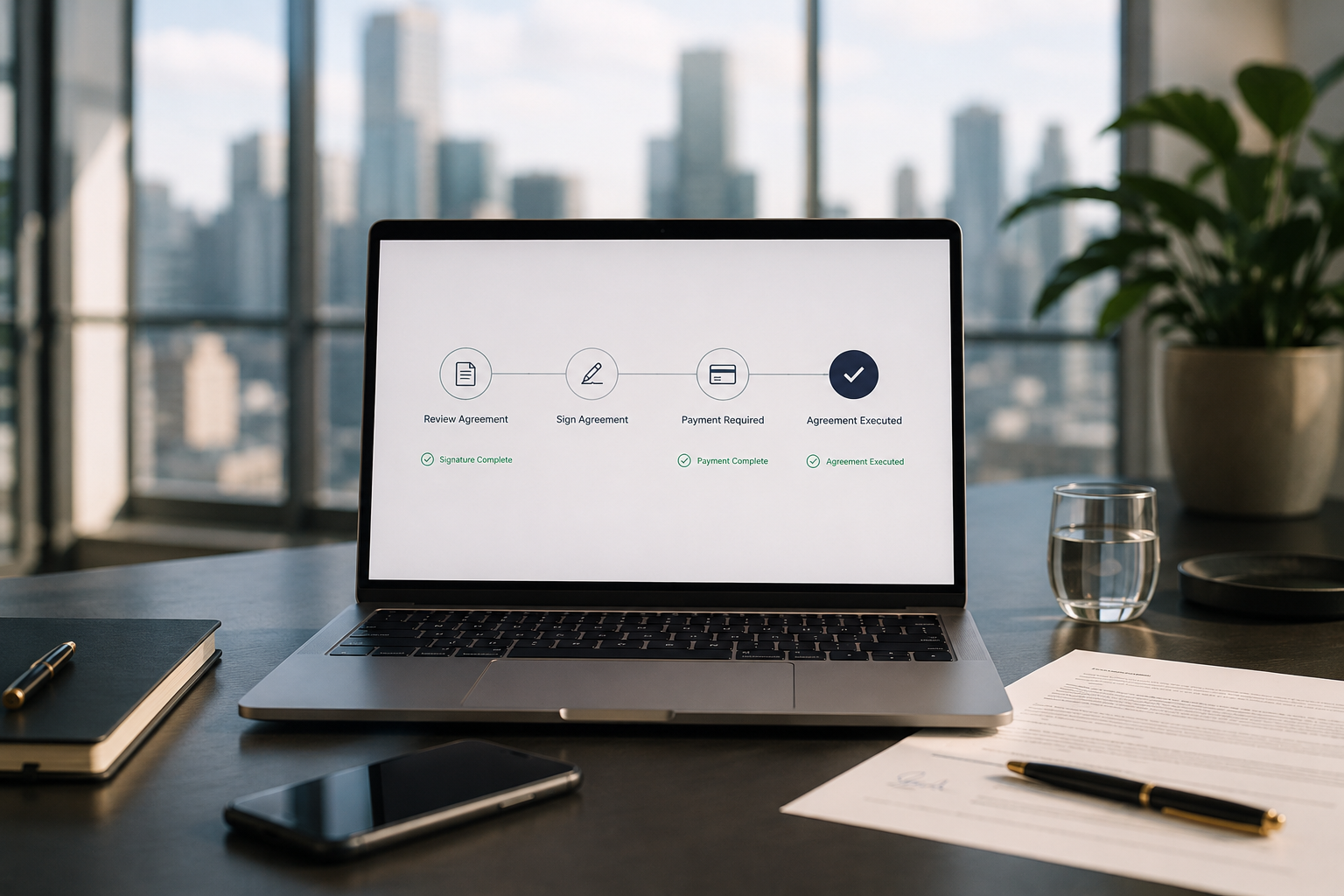
Laptop showing a connected agreement flow: Review Agreement, Sign Agreement, Payment Required, Agreement Executed
Document Governance and Control

Document governance beyond signatures.

PandaDoc focuses primarily on document creation, proposals and signatures. DociShield extends beyond signatures with document governance controls that remain active after delivery, including access controls, audit trails, watermarking, expiry controls and revocation.

  • Access controls
  • View controls
  • Dynamic watermarking
  • Full audit trails
  • Expiry controls
  • Access revocation
A reviewer reading a Business Agreement with a Document Status panel showing Access Controlled, View Limited, Watermarked, Audit Recorded, and Access Revocable
Find your fit

Which platform fits your workflow?

Consider PandaDoc if…

  • Proposal creation and sales document automation are your primary requirements
  • Your sales team relies on interactive pricing tables and document formatting
  • Payment collection after signing as a separate step is acceptable
  • Deep CRM integration for sales workflows is important

Consider DociShield if…

  • You need payment to continue inside the same transaction flow as signing
  • You need document protection controls including download limits and watermarking
  • You need access revocation while the document is under your control prior to execution
  • You send service agreements, onboarding documents, or commercial contracts
  • WhatsApp and SMS delivery are important to your workflow
  • You need payment collection on the free plan
Plans and pricing

Pricing at a glance.

PandaDoc
Per-user pricing · payments via Stripe and PayPal
Free
$0/month
  • 60 documents per year
  • Maximum 2 recipients per document
  • No payment collection
Starter
$19/user/month billed annually
  • Electronic signatures
  • Templates
  • Basic document workflows
Business
$49/user/month
  • Advanced workflows
  • Bulk sending available
  • SMS available on qualifying annual plans
Enterprise
Custompricing
  • Advanced integrations and enterprise controls
DociShield
Flat plan pricing · payments included on every plan
Starter
$0/month
  • 5 agreements per month
  • Payment collection supported
  • Electronic signatures
  • Document tracking
  • Audit trail
Essential
$79/month
  • 3 users included
  • 100 agreements per month
  • Payment collection
  • SMS delivery
  • WhatsApp delivery
  • Document controls
  • Audit trail
  • Expiry controls
  • Watermarking
Pro
$179/month
  • 500 agreements per month
  • All core platform features
  • Higher workflow volume
Vault
$389/month
  • 2,000 agreements per month
  • All core platform features
  • Highest workflow volume

Different pricing philosophies.

PandaDoc primarily uses per-user pricing designed for sales and proposal teams. DociShield uses workflow-based pricing designed around governed document transactions, signatures, payments, audit visibility, and document control. Neither approach is inherently better. The right choice depends on how your business works.

All prices in USD verified from official sources June 2026. SMS delivery on PandaDoc is limited to Business Annual and Enterprise Annual. WhatsApp delivery on PandaDoc is not confirmed in official documentation. DociShield SMS and WhatsApp are supported on all standard plans, with usage allowances and overage charges based on plan and volume. Always verify current pricing directly with each vendor.

Modern workspace with laptop showing a signed agreement surrounded by outcome cards: Agreement Signed, Payment Received, Document Protected, Audit Recorded
One platform

One workflow. One platform.

Some businesses use PandaDoc for proposals and signatures alongside separate tools for document protection, watermarking, and payment governance. DociShield combines document protection, signatures, and payment collection inside the same transaction flow. For organisations that need governed transactions rather than sales document automation, DociShield may reduce the number of systems required.

FAQ

Frequently asked questions

Based on official PandaDoc documentation reviewed in June 2026, the recipient signs the document first and then completes payment as a separate step after signing is complete. DociShield keeps payment inside the same transaction flow. After signing, the recipient proceeds directly to payment and the agreement is only marked as executed once both the signature and payment events have been completed. There is no separate invoice workflow, follow up request, or disconnected payment step. Source: PandaDoc Payments Recipient Guide, June 2026.
Yes. PandaDoc's free plan allows up to 60 documents per year with a maximum of 2 recipients per document. Payment collection is not included on the free plan. DociShield's Starter plan is free and includes payment collection.
Governance controls remain attached to the document after delivery, including visibility, access controls, watermarking, audit evidence, expiry controls, and document restrictions. PandaDoc is focused primarily on document creation, signatures, and sales workflows.
PandaDoc is designed around sales proposals and document automation. DociShield is designed around governed document transactions including service agreements and commercial contracts where payment continues inside the same transaction flow as signing. For service businesses sending agreements with deposit requirements, the DociShield workflow may be a closer fit.
PandaDoc's paid plans start at $19 per user per month billed annually. Payment collection is not available on the free plan. DociShield's Starter plan is free and includes payment collection with transaction fees only.
WhatsApp delivery was not confirmed in official PandaDoc documentation reviewed in June 2026. DociShield supports WhatsApp and SMS on all standard plans. Usage allowances and overage charges apply based on plan and volume.

Ready to simplify your document workflow?

Send documents, collect signatures, take payments and stay in control from a single platform.

No credit card required. From signup to first agreement in minutes.